

Choosing the right WordPress LMS depends on how you want to create learning content, manage learners, and scale your training environment over time. Both LearnDash and MentorKit Pro support online courses, ecommerce, and learner management, but they are built around very different workflows.
When choosing a WordPress LMS, two very different approaches stand out: LearnDash and MentorKit Pro.
At first glance, both platforms cover many of the same essentials — courses, learner management, certificates, reporting, ecommerce integrations, and progress tracking. But once you look deeper, it becomes clear that these systems are built around very different philosophies.
LearnDash focuses heavily on building and managing courses directly inside WordPress.
MentorKit Pro takes a more workflow-oriented approach, separating content production from learning delivery and management. Instead of using WordPress as the primary course authoring environment, it is designed around structured e-learning workflows, organizational training, WooCommerce integration, and scalable learning management.
Both platforms are strong LMS solutions, but they are designed for different types of organizations and learning environments.
The most important question is not simply: “Which LMS has more features?” The better question is: “How do you want to create, manage, and scale your learning platform over time?”
Feature Comparison
| Feature | LearnDash | MentorKit Pro |
|---|---|---|
| Pricing | Starting at €259/year + hosting | Starting at €0/year |
| Course Management | Yes | Yes |
| SCORM Learning Support | No native support | Native support |
| External Authoring Integration | Limited | MentorKit Course Creator integration |
| Course Creation Workflow | Built directly inside WordPress | External authoring + automated content delivery |
| Course Structure | Courses, lessons, topics | Structured course packages |
| Quizzes & Assessments | Native WordPress quiz engine | Via MentorKit Course Creator |
| Certificates | Built-in certificates | Advanced certificates + bundle certificates |
| Organizational Training Features | Basic to moderate | Advanced |
| Group Management | Yes | Yes |
| WooCommerce Integration | Supported | Deep integration |
| Native Payments Options | Stripe & PayPal | Via WooCommerce ecosystem |
| Reporting & Analytics | Course-focused | Group & workflow-focused |
| Notifications & Communication | Standard LMS notifications | Advanced workflow-based notifications |
| Content Ownership | Full WordPress ownership | Full WordPress ownership |
| Ease of Content Updates | Managed directly in WordPress | Structured content workflows |
| Customization Flexibility | Extensive | Extensive |
| Multilingual Support | Yes | Yes |
Two Different LMS Philosophies
The biggest difference between LearnDash and MentorKit Pro is not the feature list. It is the workflow.
LearnDash: WordPress-Native Course Creation
LearnDash is designed around building courses directly inside WordPress. Administrators create lessons, quizzes, assignments, topics, and learning paths using WordPress content structures. For creators and organizations already comfortable working inside WordPress, this can feel intuitive and highly flexible.
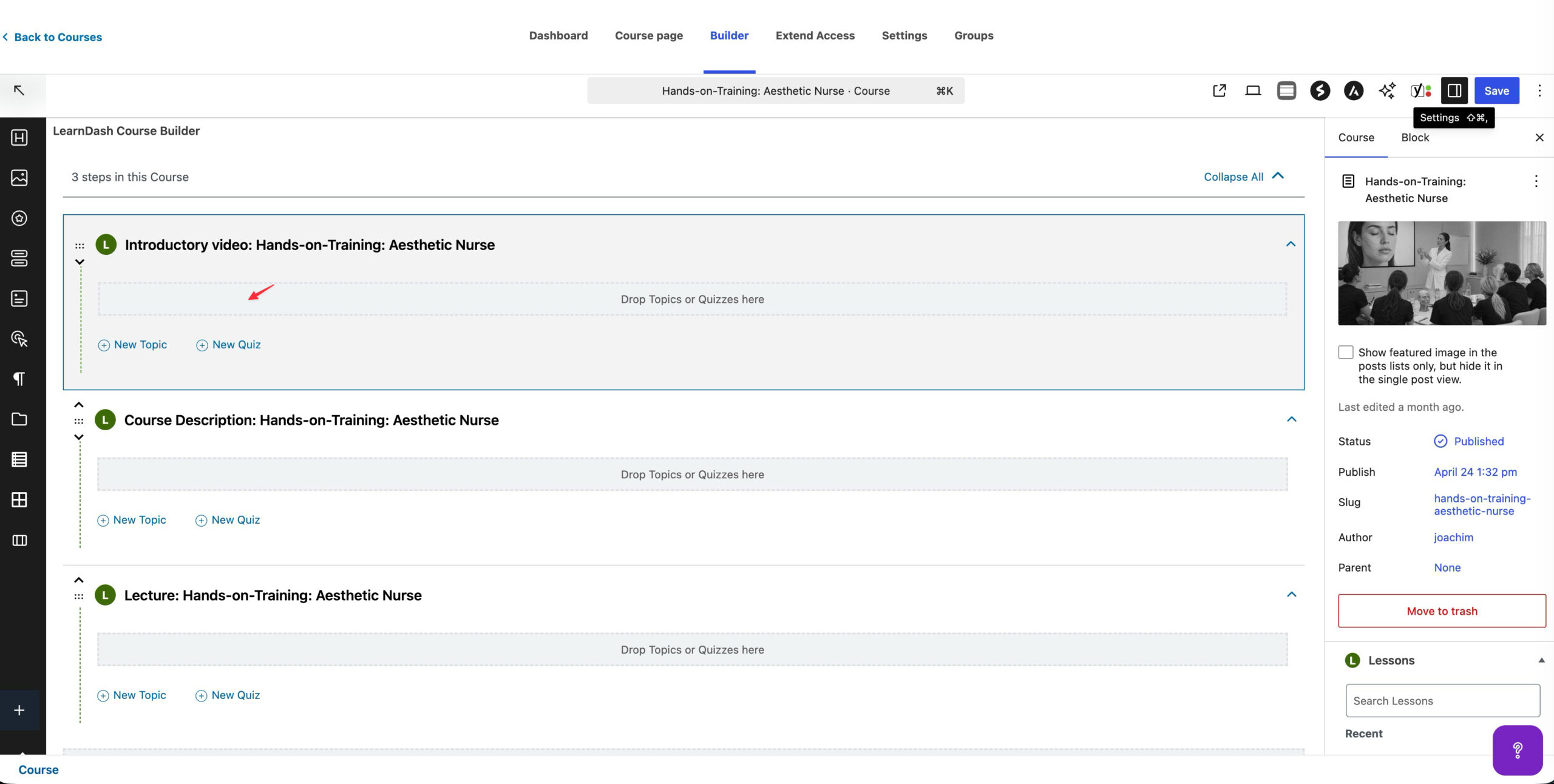
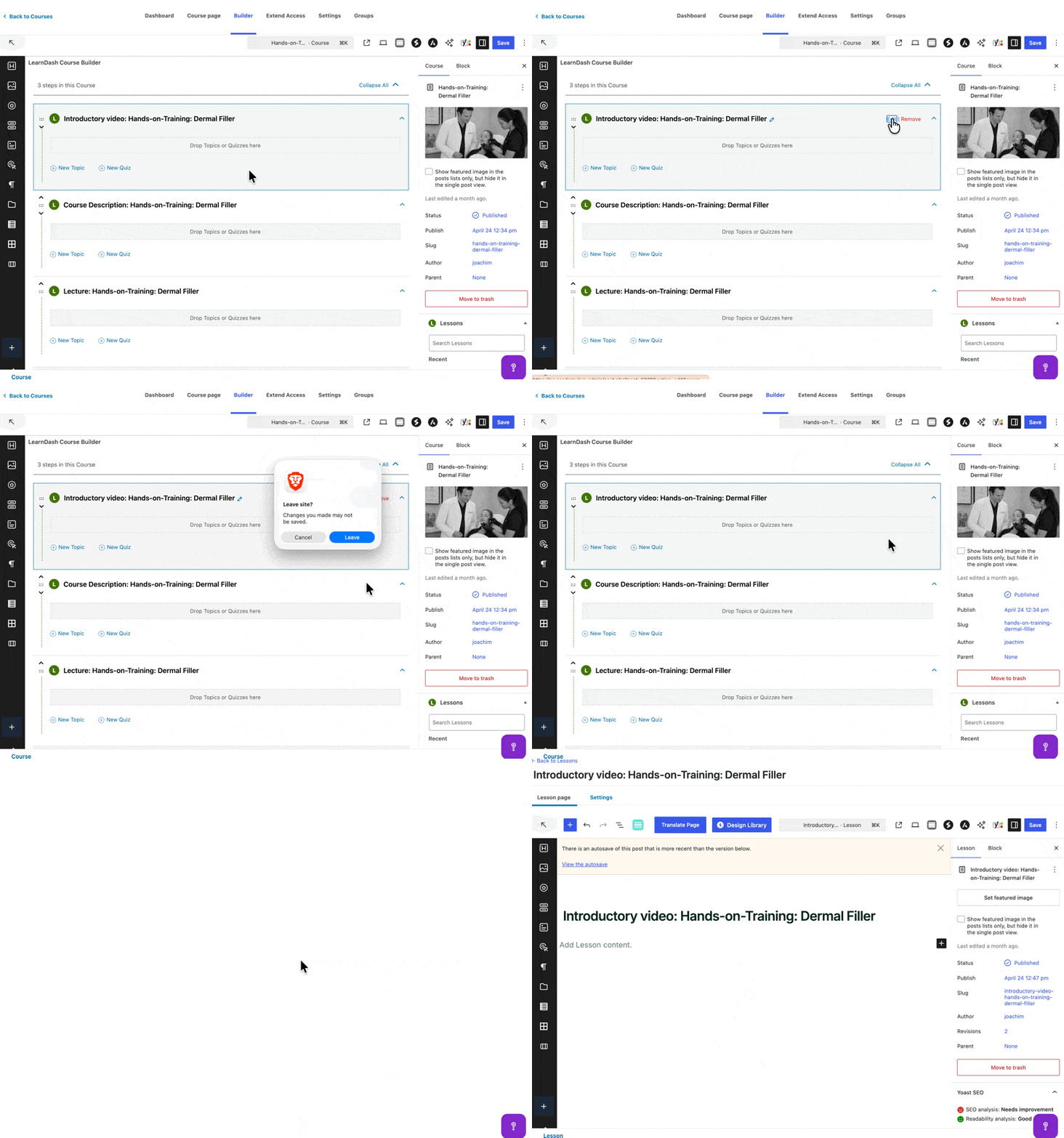
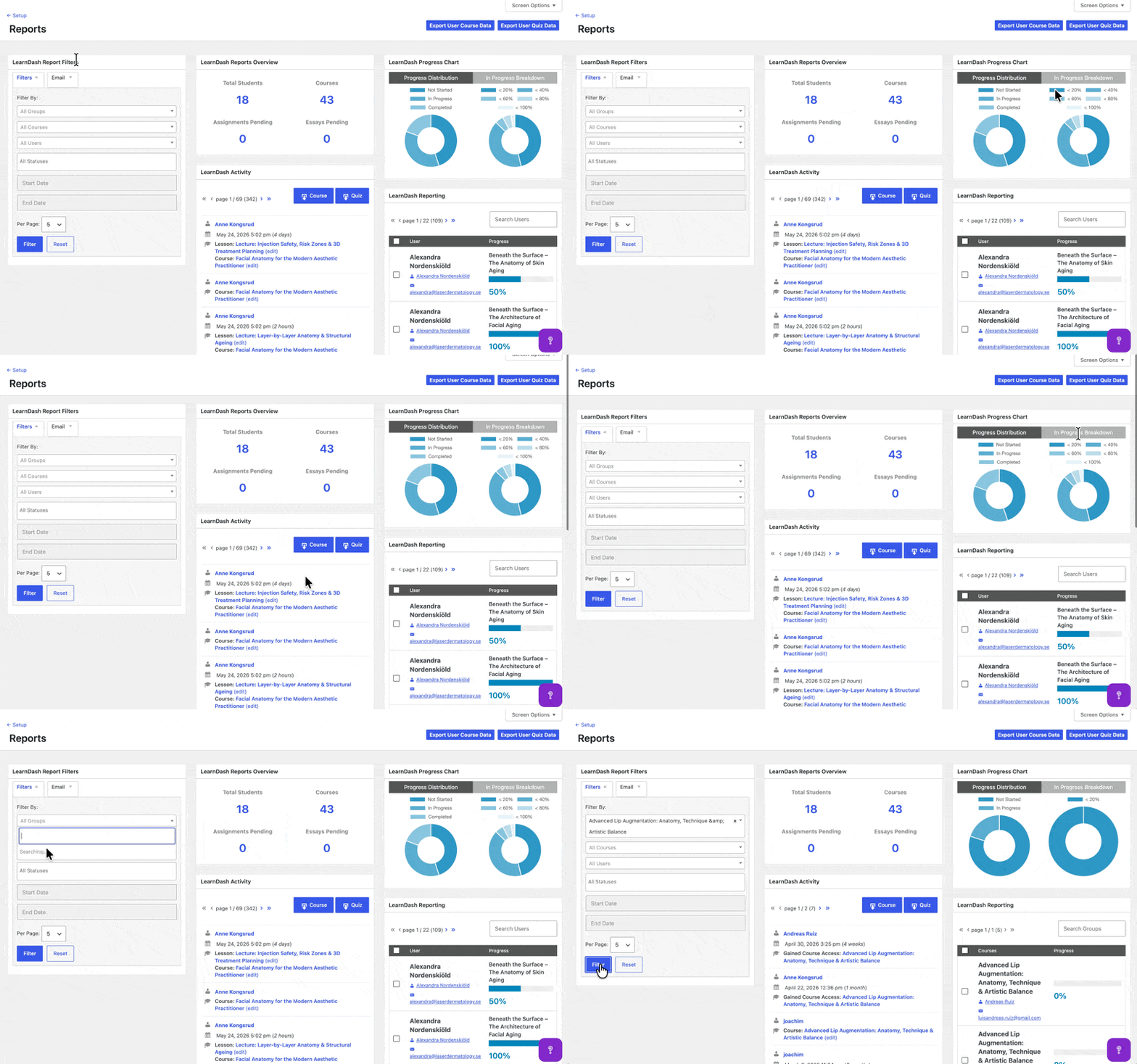
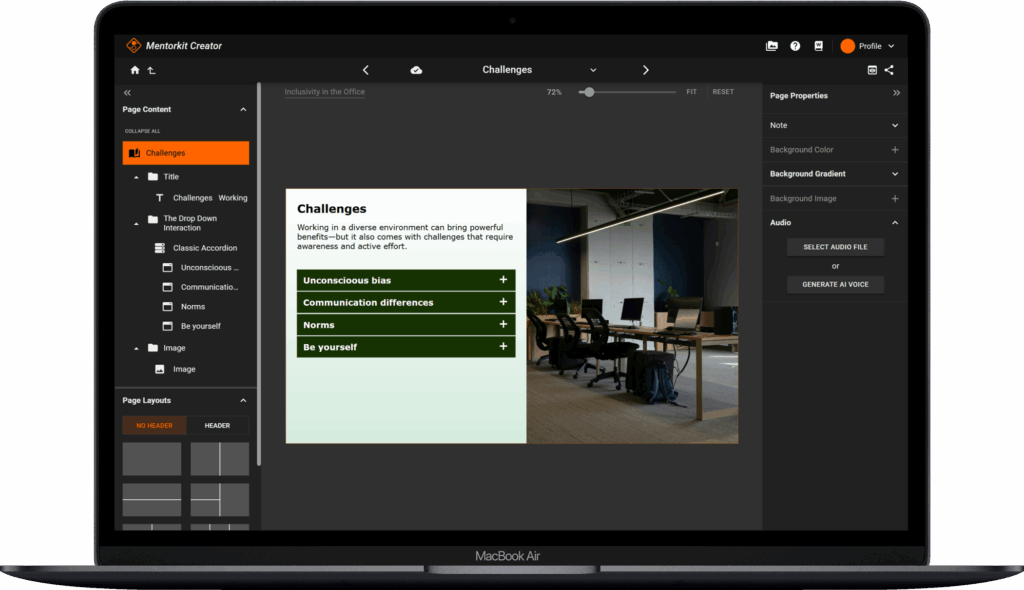
Below you see the LearnDash Course Builder(on the left side) which has one of its biggest issues in the interface—you get taken out of the course creator, so if you don’t understand post types and navigation between posts, the workflow for making a course is problematic.
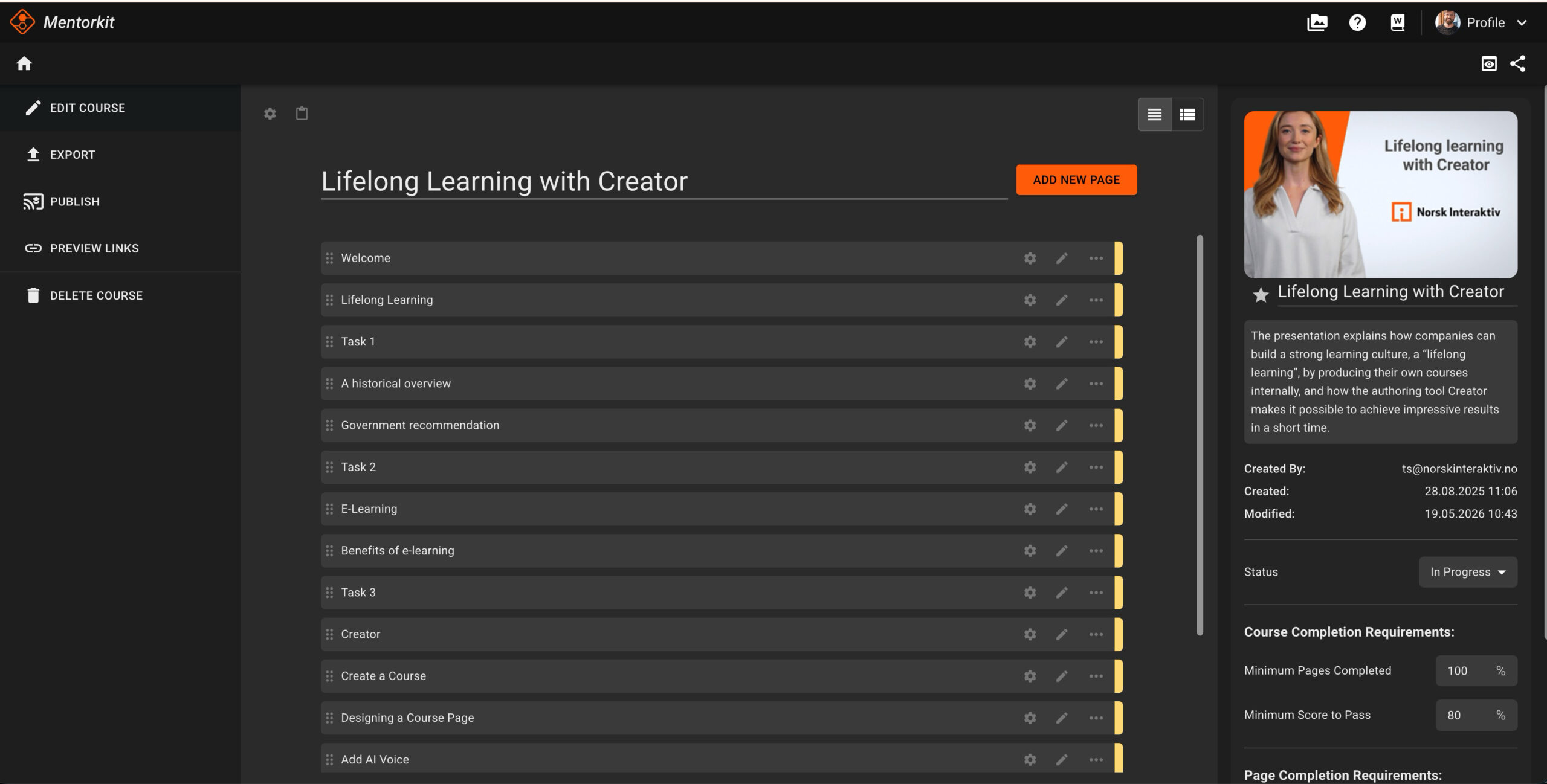
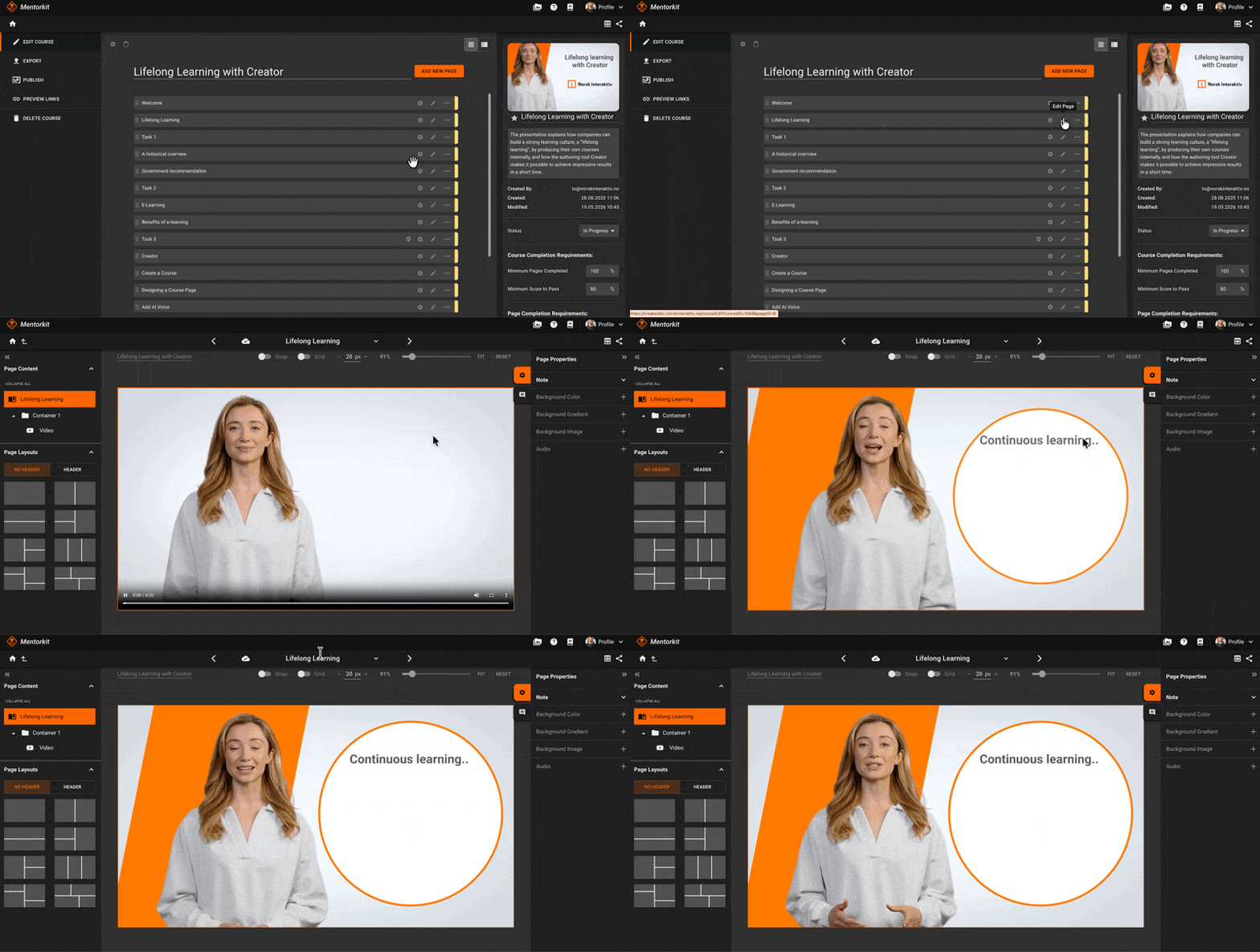
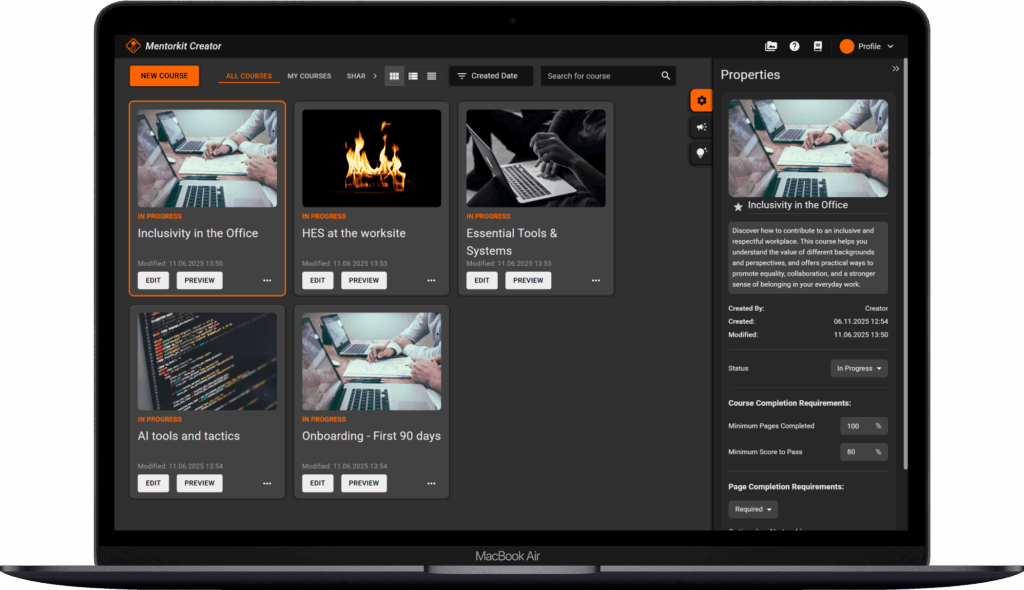
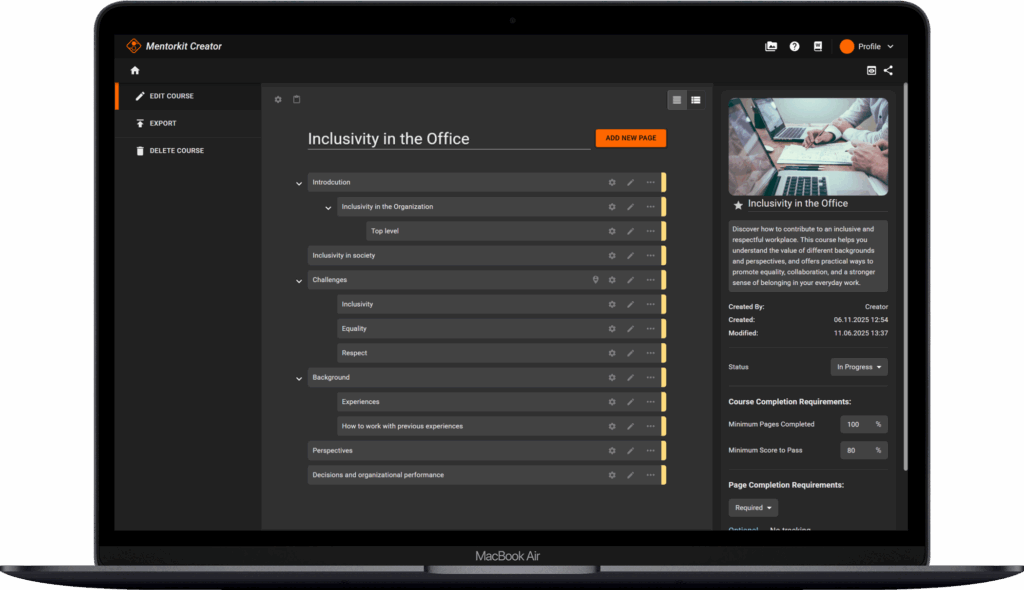
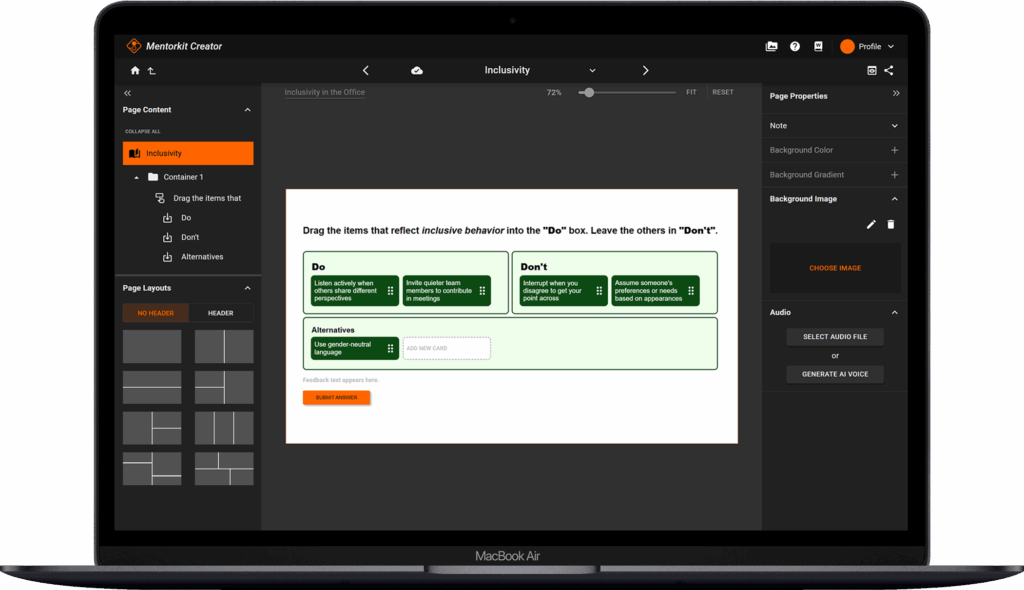
On the right side, you see the MentorKit Course Creator modules editor. The most important workflow is that you click on a module and stay in the window, making it much simpler to navigate and build a course.
LearnDash is especially well suited for:
- educational websites,
- membership platforms,
- coaching businesses,
- independent course creators,
- and WordPress-first learning businesses.
Because the learning content lives directly inside WordPress, LearnDash gives administrators extensive control over:
- lesson progression,
- drip schedules,
- prerequisites,
- quizzes,
- assignments,
- and learner journeys.
For creators who want complete control over the course-building experience inside WordPress, LearnDash remains one of the most mature LMS platforms available.
MentorKit Pro: Structured Learning Delivery
MentorKit Pro approaches learning management differently. Rather than treating WordPress as the primary authoring environment, MentorKit Pro is designed around scalable course delivery and organizational training management. In many cases:
- learning content is created externally,
- courses can be updated and delivered automatically through the LMS,
- and WordPress becomes the platform for delivery, tracking, reporting, ecommerce, and training management.
This creates a clearer separation between content production and day-to-day learning management. For organizations regularly updating training materials, managing onboarding programs, or delivering large-scale learning initiatives, this workflow can become easier to maintain and scale over time.
Structured Learning Workflows and SCORM Support
One of the clearest differences between the two platforms is how they handle structured learning content.
LearnDash focuses primarily on WordPress-native course creation. Courses, lessons, quizzes, and assignments are built directly within the LMS itself.
MentorKit Pro is more heavily focused on structured learning workflows and external course production. The platform includes native support for:
- SCORM uploads,
- learner progress tracking,
- completion management,
- embedded learning experiences,
- and MentorKit Course Creator integration.
For organizations working with:
- employee training,
- compliance learning,
- customer onboarding,
- certification programs,
- or reusable learning content,
this workflow can significantly reduce administrative overhead.
Instead of manually rebuilding course structures inside WordPress, course materials can be updated and managed separately while the LMS handles learner access, reporting, ecommerce, and operational workflows. This separation between content production and LMS administration is one of MentorKit Pro’s strongest differentiators.

Different Approaches to Course Creation
A traditional feature comparison can sometimes make LearnDash appear more powerful because it includes a large number of learning tools directly inside WordPress, including:
- quizzes,
- assignments,
- essays,
- exams,
- lesson progression,
- and course prerequisites.
MentorKit Pro handles many of these elements differently. Rather than building all learning activities directly inside WordPress, assessments and learning logic can be created externally and then delivered through the LMS as part of a more structured learning workflow. This creates a different type of learning management experience.
LearnDash prioritizes WordPress-native flexibility, and MentorKit Pro focuses more on operational structure, maintainability, and scalable training workflows. Neither approach is universally better — they simply solve different types of learning challenges.

Ease of Use and Administration
Both LearnDash and MentorKit Pro operate within WordPress, but they create very different administrative experiences.
LearnDash is designed around managing everything directly inside WordPress. For course creators already familiar with WordPress content management, this can feel highly intuitive and flexible.
MentorKit Pro introduces a more structured workflow where learning content is often managed separately from the LMS itself. While this can involve a slightly different production process, it may also reduce complexity for organizations managing larger training environments or frequently updating learning content.
The difference ultimately comes down to how courses are created and maintained over time.
LearnDash prioritizes direct WordPress course creation.
MentorKit Pro focuses more on structured learning operations and long-term scalability.
Course Structure and Learner Experience
LearnDash offers a deep and highly customizable learning hierarchy built around:
- courses,
- lessons,
- topics,
- quizzes,
- prerequisites,
- and drip content.
This works especially well for educational websites and creators who want detailed control over learner progression directly inside WordPress.
MentorKit Pro uses a more streamlined structure focused on:
- learning delivery,
- learner access,
- group management,
- progress tracking,
- certificates,
- and reporting workflows.
For organizations delivering standardized training programs or managing larger learner groups, this simplified operational structure can become a significant advantage.
Group Management and Corporate Training
Both platforms support learner groups and administrative management features. However, MentorKit Pro appears more directly optimized for:
- corporate training,
- customer education,
- team onboarding,
- partner training,
- and organizational learning environments.
Features such as:
- group leaders,
- learner assignment workflows,
- organizational progress tracking,
- and group dashboards
make it particularly suitable for B2B training operations and larger learning ecosystems.
LearnDash also supports groups and memberships, but its overall structure remains more centred around WordPress-native course creation.
Certificates and Completion Tracking
Certificates are available in both platforms, but MentorKit Pro places stronger emphasis on administrative certificate workflows.
Features include:
- certificate management,
- bundle certificates,
- completion tracking,
- and manual completion controls.
For organizations managing compliance training, onboarding, or structured certification programs, certificates are often part of operational reporting and learner administration — not simply learner engagement.
This is another area where MentorKit Pro’s workflow-oriented structure becomes especially visible.
Notifications and Learner Communication
Notifications are an important part of any LMS, especially when managing enrolments, learner progress, certificates, and ongoing communication.
LearnDash includes standard LMS notifications for events such as course enrolments, completions, assignments, and quiz activity. Additional communication workflows are often handled through integrations, automation plugins, or third-party notification tools.
MentorKit Pro also supports learner and administrator communication, but with a stronger focus on operational training workflows. Notifications can be connected to certificates, learner progress, group management, WooCommerce purchases, and structured training delivery.
For organizations managing employee training, onboarding, customer education, or compliance workflows, this creates a more centralized communication structure around the learning experience.
WooCommerce and Course Sales
Both LearnDash and MentorKit Pro integrate with WooCommerce, but they approach ecommerce differently.
LearnDash supports:
- native Stripe payments,
- native PayPal payments,
- WooCommerce integrations,
- and membership extensions.
This gives course creators significant flexibility in how they monetize learning content.
MentorKit Pro, however, appears more directly built around WooCommerce as the central commerce engine. This creates a more unified workflow for:
- course sales,
- customer-specific pricing,
- group purchases,
- organizational enrolments,
- subscriptions,
- and bundled learning products.
For businesses already operating within WooCommerce ecosystems, this can simplify both ecommerce management and learner administration.
Pricing and Long-Term Scalability
Both LearnDash and MentorKit Pro operate within the WordPress ecosystem, but they approach scalability somewhat differently.
LearnDash follows a traditional LMS plugin model with annual licensing, optional add-ons, and integrations that can expand functionality over time. This gives organizations considerable flexibility, but larger learning environments may eventually rely on multiple plugins and extensions to support more advanced workflows.
MentorKit Pro takes a more workflow-oriented approach, especially for organizations managing structured learning content, WooCommerce-based sales, and organizational training.
Because both platforms operate within WordPress, long-term costs are influenced not only by the LMS itself, but also by:
- hosting,
- ecommerce requirements,
- integrations,
- maintenance,
- and operational complexity.
For organizations building larger learning ecosystems, the decision often becomes less about initial pricing and more about scalability, workflow management, and long-term platform flexibility.
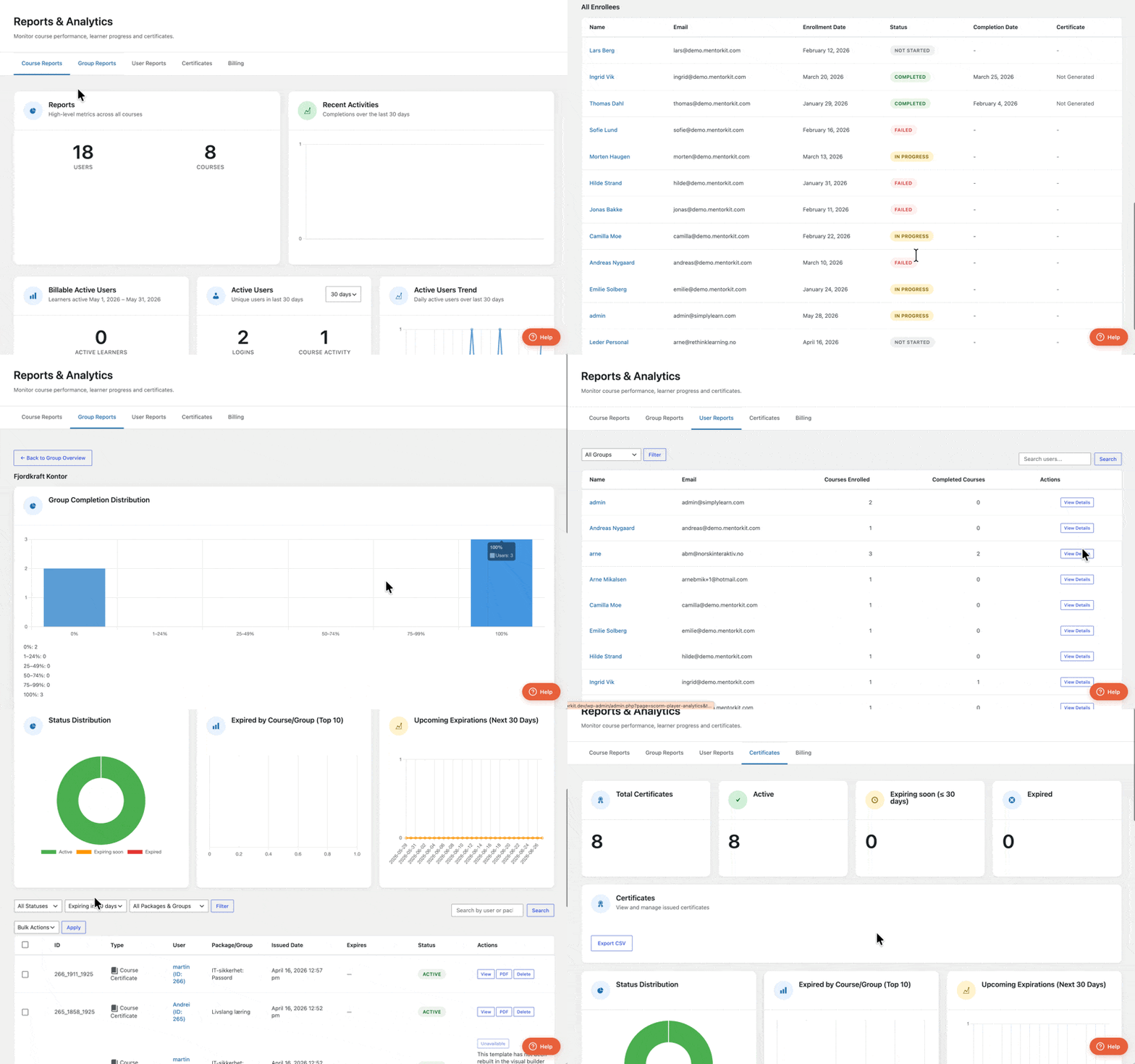
Reporting and Analytics
Both platforms provide learner tracking, reports, analytics, and CSV exports. The difference is primarily in focus. LearnDash reporting is built largely around WordPress-native learning structures and learner progression, while MentorKit Pro’s reporting appears more aligned with:
- organizational training oversight,
- group reporting,
- learner operations,
- completion tracking,
- and administrative management.
For many businesses, the key operational questions are straightforward:
- Who has started training?
- Who has completed it?
- Which learners belong to which groups?
- Who still requires certification?
MentorKit Pro appears intentionally structured around these operational learning needs.
APIs, Integrations, and Platform Flexibility
LearnDash includes a large ecosystem of integrations, extensions, and WordPress compatibility options.
MentorKit Pro also supports APIs, webhooks, ecommerce integrations, and external learning workflows, but with a stronger emphasis on structured learning operations and platform flexibility.
Both platforms benefit from the broader WordPress ecosystem, including:
- WooCommerce,
- CRMs,
- marketing tools,
- automation platforms,
- and custom integrations.
The difference again comes down to focus. While LearnDash prioritizes WordPress-native learning flexibility, MentorKit Pro focuses more on structured operational workflows and scalable training management.
When LearnDash Makes More Sense
LearnDash remains an excellent option when:
- you want to build courses entirely inside WordPress,
- you rely heavily on WordPress-native quizzes and lessons,
- you need advanced drip content,
- you want detailed lesson hierarchies,
- or you prefer a mature WordPress LMS ecosystem.
For creators and educational websites that want complete control over course creation directly inside WordPress, LearnDash remains one of the strongest LMS solutions available.
When MentorKit Pro Makes More Sense
MentorKit Pro becomes especially compelling when:
- you manage corporate or organizational training,
- you regularly update structured learning content,
- you work with external authoring tools,
- you require WooCommerce-based training sales,
- you need group-based learning management,
- or you want stronger separation between content production and learning administration.
Rather than functioning primarily as a WordPress course builder, MentorKit Pro is designed more as a structured learning management ecosystem focused on scalability and operational flexibility.
Final Thoughts
LearnDash and MentorKit Pro are both strong WordPress LMS platforms, but they solve different types of learning challenges.
LearnDash is ideal for WordPress-native course creation and works especially well for creators who want to manage everything directly inside WordPress.
MentorKit Pro is better suited for organizations that prefer a more structured learning workflow with stronger separation between content production, learner management, ecommerce, and training operations.
Neither approach is universally better — they are simply built for different types of learning environments.
Other Tips and Tricks
-
MentorKit LMS Pro vs Thinkific: Which Platform Is Better for Professional Online Learning?
The right online learning platform depends on how much flexibility you need, how you plan to manage learning content, and whether your focus is simple course sales or scalable training operations. Both Thinkific and MentorKit Pro support online learning and digital course delivery, but they are designed for very different types of learning environments.
-
The art of digital learning: How to build an engaging online course from scratch
Creating an online course doesn’t have to feel like assembling a 5,000-piece puzzle in the dark. Whether you are training employees on “New Safety Protocols” or teaching a masterclass on “Digital Marketing,” the secret lies in a structured workflow.
-
How to sell courses online: a step by step guide
A Step-by-Step Guide Ready to monetize your expertise? This guide walks you through setting up an online course storefront using an LMS platform and e-commerce tools. From pricing your course to integrating with WooCommerce and marketing your offering, learn the keys to building a successful course business.
-
5 Tips to create engaging online courses
5 Tips to Create Engaging Online Courses Make your digital training stand out! Learn how to use multimedia, interactivity, and storytelling to design courses that captivate learners from start to finish. We share practical techniques (tested in MentorKit Creator) to boost engagement and knowledge retention.


 English
  Norwegian
  Danish
  Swedish